Uploader
•15 min read•By Saman Kefayatpour

I think understanding the concept of uploaders and how they work is essential for developers, as it helps in choosing the right approach for their applications and ensures that file uploads are handled efficiently and securely. So, reading this blog post might be helpful if you’re interested in learning more about uploaders and how to implement them in your web applications.
Uploader is a powerful tool that allows developers to handle file uploads efficiently. This blog post explores the concept of uploaders and best practices for managing file uploads in web applications.
We have different types of uploaders(which I worked with), such as:
Let's see structure of each approach, how they work and useful libraries for each approach in JavaScript.
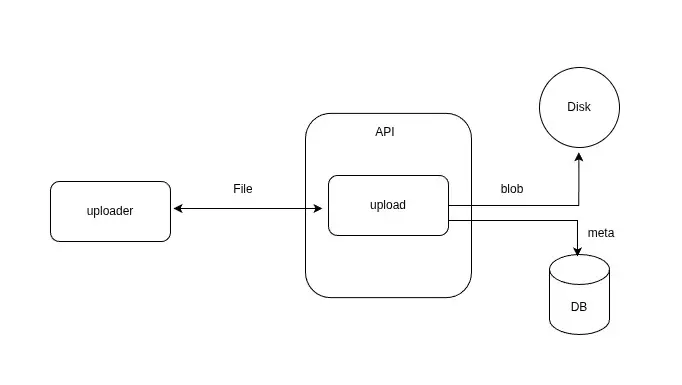
These uploaders use forms to submit files to the server. They typically involve a file input element and a submit button. When the form is submitted, the file is sent to the server as part of the form data. The files are saved to file system and metadata is stored in the database.
Pros:
Cons:
Useful libraries:

These uploaders allow files to be uploaded in a streaming manner, which can be more efficient for large files. The client can stream the file data directly to the server, and the server can process the data as it is received. This approach can reduce memory usage and improve performance, especially for large files.
Pros:
Cons:
Useful libraries:
Why S3 Uploaders?
The main reason for using S3 uploaders is that user can upload files directly to Amazon S3 without passing through the server, which can reduce server load and improve performance. Additionally, S3 provides features like durability, scalability, and security, making it a popular choice for file storage in web applications.
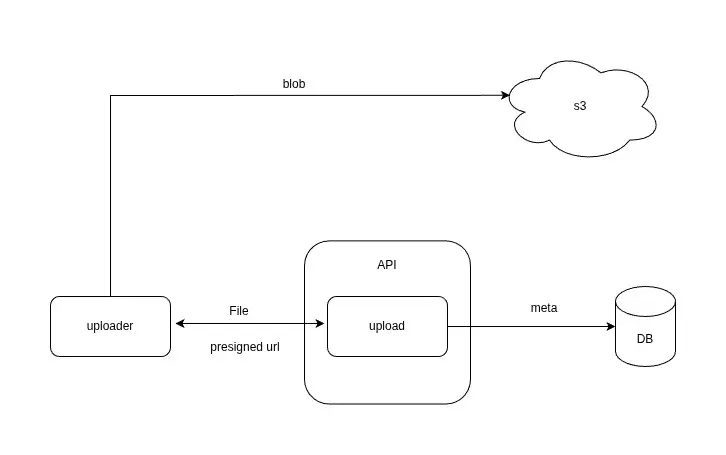
These uploaders allow files to be uploaded directly to Amazon S3 without passing through the server. The server generates a pre-signed URL for the file upload, which allows client to upload the file directly to S3. The server can then store the file metadata in the database.
Pros:
Cons:
Useful libraries:

These uploaders break large files into smaller chunks and upload them separately and directly to Amazon S3. For more control over the upload process also we have concurrency, the server generates pre-signed URLs for array of chunks, allowing the client to upload each chunk directly to S3. In this way, if the upload is interrupted, the client can resume the upload from the last successfully uploaded chunk, rather than starting over from the beginning.
Also it can upload chunks in parallel, which can improve performance for large files. This approach can improve reliability and performance, especially for large files.
The steps are as follows:
See bellow picture for better understanding of the steps:

Typescript code for client side implementation of chunked uploader to S3:
export const CHUNK_SIZE = 5 * 1024 * 1024; // 5MB
export const CONCURRENCY = 4;

type UploadedPart = {
  PartNumber: number;
  ETag: string;
};

export async function uploadS3File(file: File) {
  const initRes = await fetch(`${import.meta.env.VITE_API_URL}/upload/init`, {
    method: "POST",
    body: JSON.stringify({
      fileName: file.name,
      contentType: file.type,
    }),
    headers: { "Content-Type": "application/json" },
  });

  const { uploadId, key } = await initRes.json();

  const totalParts = Math.ceil(file.size / CHUNK_SIZE);
  const uploadedParts: UploadedPart[] = [];

  let currentPart = 1;

  async function uploadChunkBatch() {
    if (currentPart > totalParts) return;
    const batch = [];
    for (let i = 0; i < CONCURRENCY && currentPart <= totalParts; i++) {
      batch.push(currentPart++);
    }

    // Lazy request
    const res = await fetch(`${import.meta.env.VITE_API_URL}/upload/parts`, {
      method: "POST",
      body: JSON.stringify({
        uploadId,
        key,
        partNumbers: batch,
      }),
      headers: { "Content-Type": "application/json" },
    });

    const { urls } = await res.json();

    await Promise.all(
      urls.map(({ partNumber, url }: { partNumber: number; url: string }) =>
        uploadPartWithRetry(file, partNumber, url, uploadedParts)
      )
    );

    return uploadChunkBatch();
  }

  await uploadChunkBatch();
  const completeRes = await fetch(`${import.meta.env.VITE_API_URL}/upload/complete`, {
    method: "POST",
    body: JSON.stringify({
      uploadId,
      key,
      parts: uploadedParts,
    }),
    headers: { "Content-Type": "application/json" },
  });
  const completeData = await completeRes.json();
}

async function uploadPartWithRetry(file: File, partNumber: number, url: string, uploadedParts: UploadedPart[]) {
  const start = (partNumber - 1) * CHUNK_SIZE;
  const end = Math.min(start + CHUNK_SIZE, file.size);
  const blob = file.slice(start, end);

  let attempt = 0;

  while (attempt < MAX_RETRIES) {
    try {
      const res = await fetch(url, {
        method: "PUT",
        body: blob,
      });

      if (!res.ok) throw new Error("Upload failed");

      const etag = res.headers.get("ETag");

      uploadedParts.push({
        ETag: etag?etag.replace(/"/g, ""): "",
        PartNumber: partNumber,
      });

      return;
    } catch (err) {
      attempt++;
      if (attempt >= MAX_RETRIES) {
        throw err;
      }
    }
  }
}
Pros:
Cons:
Useful libraries:
Let's recap the pros and cons of each approach:
| Uploader Type | Pros | Cons |
|---|---|---|
| Traditional Form Uploaders | Simple to implement, works well for small files | Inefficient for large files, can cause server load |
| Stream Uploaders | Improved performance, reduced memory usage | More complex implementation, requires additional server logic |
| Put Object | Reduced server load | More complex implementation, requires additional server logic |
| Multipart Upload | Improved reliability, better performance for large files | More complex implementation, requires additional server logic |
I’ve provided this cheat sheet to help you choose the right uploader type based on your application requirements. It’s a general guideline, and the actual choice may still depend on the specific use cases and constraints of your application.
| Use Case | Recommended Uploader Type | Typical File Size | Concurrency(Users) |
|---|---|---|---|
| Small files | Traditional Form Uploaders | < 5MB | Low(~50) |
| Small to Medium files | Put Object | < 100MB | High |
| Medium files | Stream Uploaders | 5MB – 100MB | Medium(< 1K) |
| Medium to Large files | Multipart Upload | > 100MB | High |
In conclusion, understanding the concept of uploaders and their different types is essential for developers to choose the right approach for their applications.
Each uploader type has its own advantages and disadvantages, and the choice depends on the specific requirements of the application, such as file size, performance needs, and server resources.
As always, I may miss some points, so if you have any questions or suggestions, please feel free to share them with me. If you know a better approach or library for handling file uploads, I’d love to hear about it. I’m always open to learning and improving my knowledge.
Stay humble and keep learning!