How React VDOM and Fiber Engine Render Your UI
•9 min read•By Saman Kefayatpour
When we write React applications, we often hear terms like the Real DOM, the Virtual DOM, and React Fiber thrown around. It is easy to think of them as a single, magical machine that somehow updates our screens.
However, under the hood, React divides its work into a highly organized construction site. To truly understand how React renders a component, it helps to look at it through a single analogy: building a skyscraper.
The Real DOM is the actual, physical skyscraper built out of concrete and steel inside the browser.
Modifying the Real DOM directly is a heavy, expensive operation. If you want to move a window or repaint a room, changing the physical structure directly on-site forces the browser to recalculate layouts and redraw pixels. If you do this too many times or too quickly, the entire construction site slows down, causing the website to stutter or freeze.
To avoid modifying the physical skyscraper constantly, React uses a Virtual DOM (VDOM). The VDOM is a lightweight, temporary paper blueprint of our building. It is incredibly fast and cheap to sketch out a new blueprint or tear an old one up.
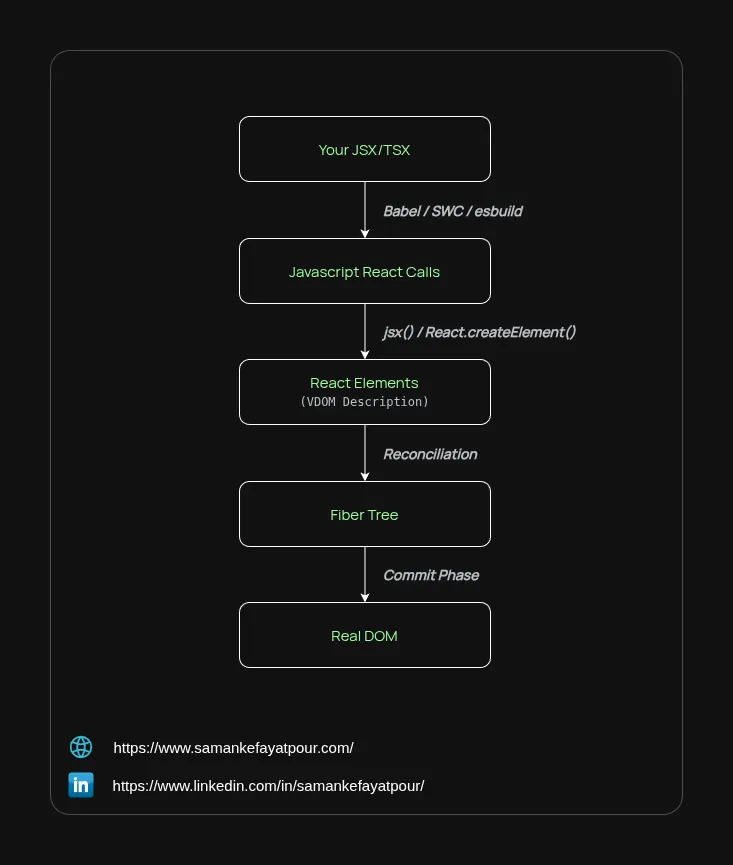
Browsers do not natively understand JSX or TSX syntax. Before the browser can execute your file, build tools like Babel, SWC, or esbuild act as compiler engines to rewrite your HTML-like tags into standard JavaScript functions.
When the browser runs these underlying compiled functions (like _jsx or React.createElement), they instantly evaluate and return a simple, nested JSON object.
If you write this JSX:
<main>
  <h1>Hello</h1>
  <p>World</p>
</main>
The Compiled JavaScript React Call (Modern Runtime):
import { jsx as _jsx } from 'react/jsx-runtime';

_jsx("main", {
  className: "container",
  children: _jsx("h1", { children: "Hello" })
});
The browser runs the compiled JavaScript calls and generates this Virtual DOM object on every single render:
{
  "type": "main",
  "props": {
    "children": [
      { "type": "h1", "props": { "children": "Hello" } },
      { "type": "p", "props": { "children": "World" } }
    ]
  }
}
Notice that the VDOM blueprint uses a standard children array. This is because JavaScript engines are highly optimized for creating simple, nested arrays quickly.
In older versions of React, the rendering engine would read this nested array blueprint recursively from top to bottom. Once the process started, it could not stop until it reached the very end. If your blueprint was massive, the foreman would trap the browser's main thread, causing laggy inputs and dropped animation frames.
To solve the blocking problem, React 16 introduced the Fiber Engine. A common misunderstanding is that Fiber completely replaced the VDOM. In reality, they work together.
The interaction between the two happens in a precise sequence:
Update or Placement.The UI layout is conceptually a tree, but Fiber organizes its nodes into a singly-linked network. Every individual Fiber node contains exactly three directional pointers:
child: Points only to its first child.sibling: Points only to its immediate next sibling.return: Points back up to its parent.Instead of generic configuration keys, an actual Fiber node in React's source code contains explicit properties to track the state, the physical DOM reference, and its place in the linked chain.
If we look under the hood at the main element and its first child h1 from our example, their actual memory structures look closer to this:
// The 'main' Fiber Node
const mainFiber = {
  type: 'main',
  elementType: 'main',

  // Pointers to neighbors
  child: h1Fiber,       // Points ONLY to the first child
  sibling: null,        // No siblings beside <main>
  return: parentFiber,  // Points back up to the wrapper component

  // Actual DOM reference
  stateNode: HTMLMainElement,

  // Working data
  memoizedProps: { children: [...] },
  memoizedState: null,  // This is where hooks would be stored if it were a function component
  flags: 0,             // Bitwise flags indicating updates (e.g., Placement, Update)
};

// The 'h1' Fiber Node
const h1Fiber = {
  type: 'h1',
  elementType: 'h1',

  // Pointers to neighbors
  child: helloTextFiber, // Points to its internal text node
  sibling: pFiber,       // Points directly to its neighbor, the <p> tag
  return: mainFiber,     // Points back up to its parent

  stateNode: HTMLHeadingElement,
  memoizedProps: { children: "Hello" },
  memoizedState: null,
  flags: 0,
};
Because the nodes are linked like a single track rather than a nested loop, React can traverse them using a simple while loop.
If the foreman is processing the h1 node and a user suddenly types into an input field, React can pause the work loop, save the pointer to the next station (h1.sibling), let the browser handle the typing animation smoothly, and then jump right back onto the scaffolding to finish processing the p node.
Now we can see how the entire lifecycle balances itself out through two distinct phases.
The foreman walks along the persistent Metal Scaffolding (Fiber Tree), comparing it to the temporary Paper Blueprint (VDOM). He marks the scaffolding nodes with instructions on what needs to change. Because no real bricks are being moved yet, this phase is entirely internal and can be safely paused, discarded, or rescheduled if a higher priority task comes up.
Once the planning is completely finished, the workers take all the marked instructions from the scaffolding and rapidly apply them to the Physical Skyscraper (The Real DOM) all at once. This phase cannot be interrupted; it must happen in a single, fast burst so that the user never sees a partially updated or broken layout on their screen.
React's true strength isn't that it updates the real DOM faster than other tools; it comes from how gracefully it manages the work of deciding what to update.
By separating the temporary UI description (the Virtual DOM) from the persistent execution engine (the Fiber Tree), React turns a rigid hierarchy into a flexible, cooperative environment. Understanding that the tree we write in JSX is managed as a flattened chain of micro-tasks under the hood gives us a clearer picture of how our applications stay responsive, fluid, and performant.
As always, I may miss some points, so if you have any questions or suggestions, please feel free to share them with me. If you know a better approach, I’d love to hear about it. I’m always open to learning and improving my knowledge.
Stay humble and keep learning!