Feature Flags
•12 min read•By Saman Kefayatpour
Imagine pushing code to production on a Friday afternoon without panicking. No massive release branches, no scary database migrations at midnight, and no immediate need to roll back an entire deployment if a bug appears.
That is the power of feature flags (also known as feature toggles).
At its simplest level, a feature flag is just a basic conditional check in your code:
if (isNewFeatureEnabled) {
  renderNewFeature();
} else {
  renderOldFeature();
}
While this simple if/else logic represents the core concept, real-world feature flagging goes much deeper. It introduces a mechanism to change that boolean condition dynamically at runtime—without modifying code, restarting applications, or redeploying your service.
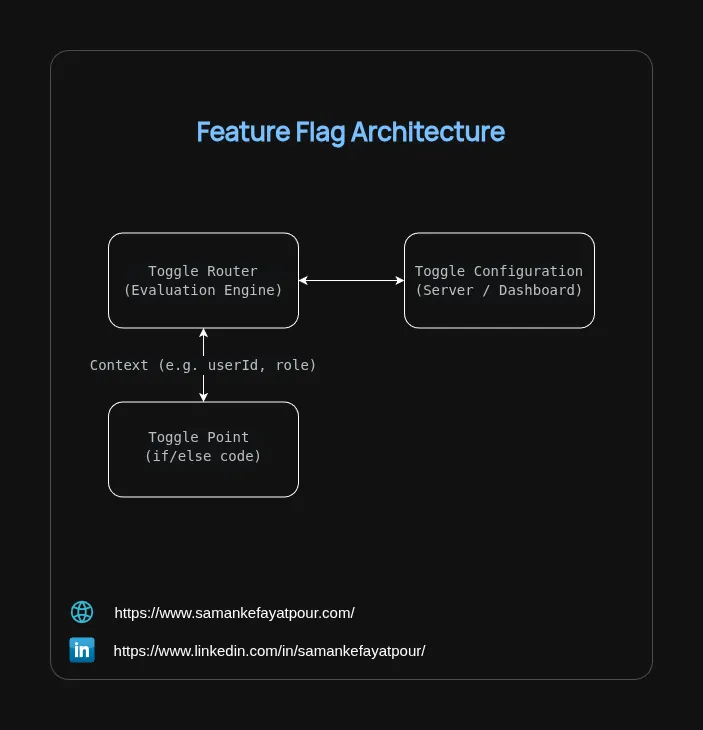
To understand how dynamic evaluation works behind the scenes, it helps to look at the overall system flow. A standard feature flag architecture connects four key pieces:
+---------------------+           +------------------------+
|    Toggle Router    | <-------> |  Toggle Configuration  |
| (Evaluation Engine) |           |  (Server / Dashboard)  |
+---------------------+           +------------------------+
          ^
          | Context (e.g. userId, role)
          v
+---------------------+
|    Toggle Point     |
|   (if/else code)    |
+---------------------+
if/else statement inside your application source code.userId, role, IP address).Not all flags serve the same purpose. They are generally categorized by their Longevity (how long they live in your code) and Dynamism (how often their values change).
| Toggle Type | Typical Lifespan | Dynamism | Main Purpose |
|---|---|---|---|
| Release Toggles | Days to Weeks | Static / Low | Safely deploy uncompleted code into production silently. |
| Experiment Toggles | Weeks to Months | Dynamic | Perform A/B or multivariate testing against metrics. |
| Ops Toggles | Months to Years | Highly Dynamic | Circuit breakers to shed system load during traffic spikes. |
| Permission Toggles | Long-Lived | Dynamic per-user | Control feature availability based on tiers or user roles. |
Release toggles should be aggressively cleaned up after a feature hits 100%, whereas Ops toggles stay in the code indefinitely as safety switches.
When starting out, developers often use basic environment variables.
// naive-toggle.ts
interface User {
  id: string;
  role: 'admin' | 'user';
}

export class ManualFeatureService {
  static isNewDashboardEnabled(user: User): boolean {
    const globalFlag = process.env.ENABLE_NEW_DASHBOARD === 'true';
    const isAdmin = user.role === 'admin';

    return globalFlag || isAdmin;
  }
}
Automated flag management platforms—such as Unleash (one of several popular enterprise and open-source flag engines)—separate flag rules from application code entirely.
According to the official Unleash architecture, how flags evaluate depends on where your code runs:
To understand how tools like Unleash manage releases without overwhelming complexity, it helps to remember two core concepts:
In practice, Unleash lets you stack these concepts together seamlessly:
[ All Traffic ]
       │
       ▼ (Strategy: Gradual Rollout @ 50%)
[ 50% Qualified Traffic ]
       │
       ▼ (Constraint: country === 'US')
[ US Users in the 50% Bucket ]
       │
       ├──── 50% ────► [ Variant A: Red Checkout Button ]
       └──── 50% ────► [ Variant B: Green Checkout Button ]
US region within that 50% sample evaluate to true.This separation keeps your application code clean while moving all targeting logic, rollout percentages, and experiment setups entirely into the management dashboard.
Here is how to set up Unleash correctly in a Node.js backend service:
import { startUnleash, Unleash } from 'unleash-client';
import express from 'express';

let unleashInstance: Unleash;
/**
 * `await startUnleash()` pauses execution until the SDK completes its initial
 * HTTP fetch and populates its in-memory strategy engine.
 * Any call to isEnabled() before this promise resolves would silently return false.
 */
export async function initUnleash(): Promise<void> {
  unleashInstance = await startUnleash({
    url: process.env.UNLEASH_API_URL || 'https://your-unleash-instance.com/api/',
    appName: 'checkout-service',
    customHeaders: {
      Authorization: process.env.UNLEASH_CLIENT_TOKEN || 'your-client-token',
    },
  });

  console.log('✅ Unleash SDK synchronized and ready for in-memory evaluations.');
}

interface UserContext {
  userId: string;
  email: string;
  country: string;
}

export function getCheckoutButtonConfig(user: UserContext) {
  // Construct context object needed by Unleash evaluation engine:
  // - userId: used by MurmurHash for consistent, sticky 50% gradual rollout
  // - properties.country: matched against the "country === US" constraint
  const context = {
    userId: user.userId,
    properties: {
      country: user.country,
      email: user.email,
    },
  };

  const FLAG_NAME = 'checkout-button-experiment';

  // Check if user qualifies (Gradual Rollout 50% AND country === 'US')
  const isQualified = unleashInstance.isEnabled(FLAG_NAME, context);

  if (!isQualified) {
    // Non-qualifying users (e.g. Non-US users or users outside the 50% rollout bucket)
    return {
      buttonColor: 'blue',
      buttonText: 'Pay Now (Legacy)',
      isExperimentParticipant: false,
    };
  }

  // For qualified users, get their assigned variant
  const variant = unleashInstance.getVariant(FLAG_NAME, context);

  switch (variant.name) {
    case 'variant-a':
    case 'red-button':
      return {
        buttonColor: 'red',
        buttonText: 'Pay Now (Variant A)',
        isExperimentParticipant: true,
      };

    case 'variant-b':
    case 'green-button':
      return {
        buttonColor: 'green',
        buttonText: 'Complete Order (Variant B)',
        isExperimentParticipant: true,
      };

    default:
      // Safety fallback in case variant definitions are missing
      return {
        buttonColor: 'blue',
        buttonText: 'Pay Now',
        isExperimentParticipant: false,
      };
  }
}

const app = express();

async function bootstrap() {
  try {
    // ALWAYS await Unleash BEFORE calling app.listen()
    await initUnleash();

    app.get('/checkout', (req, res) => {
      const user: UserContext = {
        userId: (req.query.userId as string) || 'user-101',
        email: 'dev@company.com',
        country: (req.query.country as string) || 'US',
      };

      const buttonConfig = getCheckoutButtonConfig(user);
      res.json({ user, buttonConfig });
    });

    app.listen(3000, () => {
      console.log('🚀 Express server running on http://localhost:3000/checkout');
    });
  } catch (error) {
    console.error('Failed to initialize application:', error);
    process.exit(1);
  }
}

bootstrap();
💡 Note on Code Structure: This snippet is intentionally simplified to keep the Unleash evaluation flow easy to read.
⚠️ The Cold-Start Gotcha: If you use
initialize()instead ofawait startUnleash(), the SDK fetches rules asynchronously in the background. Any request hittingisEnabled()before that first network fetch completes will silently evaluate tofalse.
The main trap with feature flags is leaving them in your codebase indefinitely. Dead flags clutter your code with obsolete branches and make testing difficult.
When creating a Release Toggle:
if/else block from your codebase.Feature flags turn high-risk deployments into low-risk, everyday events. By moving from manual environment checks to automated client SDK evaluation with tools like Unleash, software teams gain precise control over rollout speeds, targeted releases, and immediate safety rollbacks.
Whether you are trying to decouple deployments from business releases or perform canary rollouts, introducing feature toggles is one of the most effective upgrades you can bring to your modern software development lifecycle.
As always, I may miss some points, so if you have any questions or suggestions, please feel free to share them with me. If you know a better approach, I’d love to hear about it. I’m always open to learning and improving my knowledge.
Stay humble and keep learning!