Simplifying Tailwind CSS Scales with Design Tokens
•11 min read•By Saman Kefayatpour
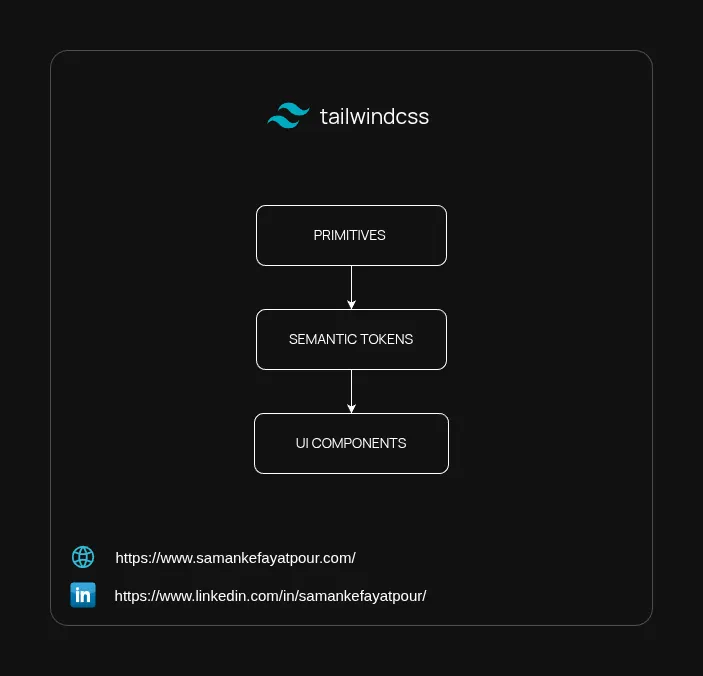
When building user interfaces, it is easy for utility classes to grow quickly. As features are added, our component files can become crowded with hardcoded values, repeated colors, and duplicated dark mode classes that make future updates a bit difficult to manage.
Tailwind CSS v4 addresses this by moving to a CSS-first engine. By utilizing native CSS features like variables and the @theme directive, Tailwind v4 allows teams to build a consistent style system that keeps the codebase organized and predictable over time.
Let’s look at why hardcoded utilities can become challenging as projects grow, how to introduce simple design tokens, and how to keep your code clean and manageable.
When we build components using literal Tailwind values like p-4, bg-slate-100, or indigo-600, we apply specific styling choices directly into the layout.
Consider this standard dashboard card:
// This approach works fine early on, but can become harder to maintain over time
export function AccountCard() {
  return (
    <div className="rounded-xl border border-slate-200 bg-white p-4 md:p-6 lg:p-8 shadow-sm transition-all hover:shadow-md dark:border-slate-800 dark:bg-slate-900">
      <h2 className="text-xl font-bold text-slate-900 dark:text-white">Account Overview</h2>
      <p className="mt-2 text-sm text-slate-500 dark:text-slate-400">Manage your subscription metrics.</p>

      <div className="mt-6 flex gap-3">
        <button className="inline-flex items-center justify-center rounded-lg bg-indigo-600 p-3 md:p-4 text-sm font-semibold text-white shadow-sm hover:bg-indigo-500 dark:bg-indigo-500 dark:hover:bg-indigo-400">
          Upgrade Plan
        </button>
      </div>
    </div>
  );
}
p-4 vs. p-5) across various pages, leading to subtle visual inconsistencies.Instead of using raw color names or exact pixel sizes everywhere, we can use an intermediate layer called semantic tokens. This simply means naming our values based on how they are used rather than what they look like.
slate-900 or indigo-600. It is often best to keep these in a central file rather than referencing them directly in UI components.sys-primary, sys-surface, or size-m. These communicate the purpose of the value clearly to anyone reading the code.Tailwind v4 lets you set up these tokens directly inside your global CSS stylesheet using standard CSS variables within the @theme block.
/* app.css */
@import "tailwindcss";

@theme {
  /* Using a consistent prefix like 'sys-' helps prevent naming conflicts */
  --color-sys-primary: var(--color-indigo-600);
  --color-sys-primary-hover: var(--color-indigo-500);
  --color-sys-secondary: var(--color-slate-200);
  --color-sys-secondary-hover: var(--color-slate-300);

  /* Backgrounds and Borders */
  --color-sys-page: var(--color-slate-50);
  --color-sys-surface: var(--color-white);
  --color-sys-border: var(--color-slate-200);

  /* Text Colors */
  --color-sys-text-base: var(--color-slate-900);
  --color-sys-text-muted: var(--color-slate-500);

  /* Standard Spacing Scale */
  --spacing-size-s: --spacing(3);   /* 12px */
  --spacing-size-m: --spacing(4);   /* 16px */
  --spacing-size-l: --spacing(6);   /* 24px */
  --spacing-size-xl: --spacing(8);  /* 32px */
}

/* Managing dark mode themes in a single step */
.dark {
  @theme inline {
    --color-sys-primary: var(--color-indigo-500);
    --color-sys-primary-hover: var(--color-indigo-400);

    --color-sys-page: var(--color-slate-950);
    --color-sys-surface: var(--color-slate-900);
    --color-sys-border: var(--color-slate-800);

    --color-sys-text-base: var(--color-white);
    --color-sys-text-muted: var(--color-slate-400);
  }
}
By redefining these variables inside the .dark class scope, Tailwind v4 updates the colors naturally down the document tree. A utility class like bg-sys-surface will automatically switch from light to dark without any extra template logic.
A helpful note: This automation relies on sticking to the token system. If a raw color like
text-slate-400is used directly in a component, it will still require the manualdark:text-slate-500class. Keeping to the system helps save time for everyone.
Where is the best place to manage shared layout structures? In Tailwind v4, we can comfortably use either framework components (like React) or small, focused CSS utilities.
@applyUsing @apply to bundle long strings of utility classes into custom CSS files often introduces architectural friction. It essentially turns Tailwind back into traditional, custom CSS, which defeats the core purpose of using a utility-first framework. It forces you to maintain an artificial abstraction layer in a separate stylesheet.
Instead, a more sustainable approach is to rely on frame-level composition. By encapsulating structural layouts into dedicated UI components (like a reusable <Card> or <Grid> wrapper in React, Vue, or Svelte), you let your framework handle UI reuse naturally. This keeps your structural utility classes right where the markup lives, ensuring your layout remains discoverable and self-contained without fracturing your styling system.
According to the official Tailwind documentation, there is still a perfect use case for @apply: when you need to write custom CSS to override styles in a third-party library.
/* Clean use of @apply: Overriding an external plugin or package */
.select2-dropdown {
  @apply rounded-b-lg shadow-sm border-sys-border;
}
When you don’t control the HTML structure—like with an external dropdown or calendar package—@apply is a fantastic tool. It allows you to style those external elements while still safely hooked into your core design system tokens. But for your own code templates, frame-level component composition is the way to go.
Instead of adjusting a component based entirely on the overall screen size (md:, lg:), Tailwind v4 offers native container queries (@container). This allows components to adjust dynamically based on the space available in their immediate parent element.
You can also name your containers so that nested elements know exactly which parent box they should respond to:
// Card.tsx - Providing a localized layout context
import React from 'react';

interface CardProps {
  children: React.ReactNode;
}

export function Card({ children }: CardProps) {
  return (
    /* We name this container 'cardLayout' so any
       child element can look to it for responsive guidance. */
    <div className="@container/cardLayout rounded-xl border border-sys-border bg-sys-surface shadow-sm transition-all hover:shadow-md">
      <div className="p-size-m @md/cardLayout:p-size-l">
        {children}
      </div>
    </div>
  );
}
If you find it helpful to create custom CSS utility classes, it works best when they focus on a single task. Bundling spacing, colors, and layout rules together into one large class can become difficult to manage later on.
/* ❌ A complex utility class that might be difficult to reuse */
@utility application-card-profile {
  display: flex;
  align-items: center;
  padding: var(--spacing-size-l);
  background-color: var(--color-sys-surface);
  color: var(--color-sys-text-base);
}

/*  A simple, single-purpose helper class */
@utility flex-center {
  display: flex;
  align-items: center;
  justify-content: center;
}
To help keep utility classes consistently organized across your team, the official prettier-plugin-tailwindcss plugin is highly recommended. It automatically sorts classes upon saving, which keeps the codebase tidy without any manual effort.
With our design tokens and containers established, our components become much lighter, more readable, and easier to support:
// Clear, readable, and easy to maintain
export function AccountOverview() {
  return (
    <Card>
      <h2 className="text-xl font-bold text-sys-text-base">Account Overview</h2>
      <p className="mt-size-s text-sm text-sys-text-muted">Manage your subscription metrics.</p>

      <div className="mt-size-l flex gap-size-s">
        {/* Primary Action */}
        <button className="flex-center rounded-lg bg-sys-primary px-size-m py-size-s text-sm font-semibold text-white hover:bg-sys-primary-hover">
          Upgrade Plan
        </button>

        {/* Secondary Action */}
        <button className="flex-center rounded-lg border border-sys-border bg-sys-surface px-size-m py-size-s text-sm font-semibold text-sys-text-base hover:bg-sys-secondary-hover/50">
          View Invoice
        </button>
      </div>
    </Card>
  );
}
To get the most out of Tailwind v4, it is helpful to look at how these theme variables interact with the rest of your tools and projects.
When you add a variable inside the @theme directive, you are directly instructing Tailwind to generate new utility classes.
@theme {
  --font-poppins: 'Poppins', sans-serif;
}
Just by writing that single line, Tailwind automatically makes a new font-poppins class available in your HTML files. You use @theme when you want a variable to automatically create a utility, and standard CSS :root rules for variables that shouldn't generate extra classes.
Some spaces in your theme are meant to define responsive rules or system-wide states rather than visual styles. For instance, values in the --breakpoint-* namespace determine how screen size variations behave:
@theme {
  --breakpoint-3xl: 120rem; /* Creates a custom 3xl: variant */
}
This is also where we configure how dark mode responds. By default, Tailwind v4 listens to the user’s operating system preferences (prefers-color-scheme). If your project uses a manual toggle button that adds a .dark class to the HTML element, you can politely instruct Tailwind to look for that class instead:
/* Telling Tailwind to look for the .dark class instead of system settings */
@custom-variant dark (&:where(.dark, .dark *));
Because Tailwind v4 relies entirely on native CSS, you don't need a special configuration language to link values together. You can simply use standard CSS var() syntax to build your tokens from existing options:
@theme {
  /* Using Tailwind's default gray palette to make a semantic token */
  --color-sys-bg: var(--color-gray-50);

  /* Connecting a secondary token to a primary one */
  --color-sys-brand-dark: var(--color-sys-primary);
}
If your team maintains multiple applications—especially inside a monorepo—sharing a unified design system becomes very straightforward. Since Tailwind v4 uses standard CSS, you don't need a complex JavaScript config exporter.
You can place your core theme in a shared workspace directory and import it directly into the main stylesheet of any application:
/* apps/web-app/src/app.css */
@import "tailwindcss";

/* Direct internal import from your shared monorepo package */
@import "../packages/design-system/theme.css";
This keeps all your applications perfectly aligned with your branding guidelines instantly.
Building a sustainable layout system with Tailwind v4 is all about steady, simple choices. By managing our core design decisions at the CSS theme layer with @theme, we create a codebase that is gentle to work with and straightforward to evolve.
Letting components handle structural layouts, keeping utilities focused on individual tasks, and utilizing formatting tools helps support a balanced workflow. This gentle separation of concerns keeps the interface clear and helpful for every engineer on the team.
As always, I may miss some points, so if you have any questions or suggestions, please feel free to share them with me. If you know a better approach, I’d love to hear about it. I’m always open to learning and improving my knowledge.
Stay humble and keep learning!